
Connect with us

Tech

The Ultimate HP Trivia Quiz: Test Your Knowledge of a Tech Giant

Published

on

hp trivia quiz

Test Your Knowledge of a Tech Giant

When you think of technology pioneers, few names carry as much weight as Hewlett-Packard. From a modest garage in Palo Alto to a global empire that helped define Silicon Valley, HP’s story is one of relentless innovation, visionary leadership, and a unique corporate culture that became known as “The HP Way.” For tech enthusiasts, history buffs, and loyal HP users, an HP trivia quiz offers a fascinating journey through the milestones, personalities, and quirky anecdotes that have shaped this iconic company. Whether you are preparing for a corporate quiz night, seeking to impress colleagues with your knowledge, or simply wanting to explore the legacy of Bill Hewlett and Dave Packard, this comprehensive trivia challenge will put your expertise to the test. We will delve into the founders’ early days, explore groundbreaking products, revisit memorable moments in corporate history, and even uncover some hidden gems from HP’s global operations. As we navigate through this extensive article, we will explore the key topics that any serious HP trivia quiz should cover, ensuring you have a well-rounded understanding of the company’s incredible journey from its inception in 1939 to its lasting impact on modern technology.

The Founders and The Garage: The Birth of a Tech Powerhouse

No HP trivia quiz would be complete without exploring the legendary origin story of the company. The narrative of William Hewlett and David Packard is foundational not just to HP, but to the entire Silicon Valley ecosystem. The two friends met at Stanford University in the 1930s while studying electrical engineering, and their initial discussions about starting a business were encouraged by their professor and mentor, Fred Terman . After gaining some experience, they reconvened in 1937 to plan their venture, initially considering the name “The Engineering Service Company” before settling on a name that would become globally recognized . The order of the names was famously decided by a coin toss, a small gamble that firmly established the “Hewlett-Packard” we know today . This was not their only bit of clever branding; their first product, the HP200A audio oscillator, was given a high-sounding model number to convince customers that they had a larger product catalog than they actually possessed .

The physical birthplace of HP is almost as famous as the company itself. Packard and his wife, Lucile, rented a house at 367 Addison Avenue in Palo Alto, with the iconic one-car garage becoming the company’s first workshop. The garage was not just a workshop; Bill Hewlett initially lived in a small shed in the garden of the same property . This humble space is now recognized as a California Historical Landmark, officially designated “the birthplace of Silicon Valley” . For many years, the company’s website also emphasized this key fact, noting that the founders began their partnership in 1939 in that very garage . A key piece of early trivia, and a frequent question in any “history of HP” quiz, is that the company’s first major customer was the Walt Disney Company. Disney purchased eight modified HP200B oscillators for $71.50 each to test and install sophisticated sound systems for theaters showing the groundbreaking film “Fantasia” in 1940 . This contract was a crucial early validation that provided not only vital capital—the company started with just $538 —but also a prestigious client that boosted their credibility. While the sale was important, Dave Packard later downplayed its significance, writing in his book that they were determined to succeed regardless of that one deal .

Pioneering Products: From Audio Oscillators to Personal Computing

An HP trivia quiz is incomplete without a thorough look at the company’s product history, which is a timeline of technological firsts. The early years were dominated by electronic test and measurement equipment, with products like the 524A high-speed frequency counter in 1951 earning billions for the company . The company’s first foray into computing came with the HP 2116A in 1966, designed as a rugged controller for HP’s instruments and originally meant to be used on ocean-going research vessels . The computer was HP’s first to use integrated circuits and, due to its versatility, it unexpectedly launched the company into the general-purpose minicomputer business . However, the product that truly revolutionized the industry and introduced the concept of a “personal computer” was the HP 9100A, released in 1968 . Priced at around $4900 (equivalent to over $45,000 today), the HP 9100A was marketed as a desktop calculator to avoid intimidating customers who associated “computers” with massive IBM mainframes . It was so advanced that its ads are credited with coining the phrase “personal computer” itself .

The trend of making powerful technology accessible to individuals continued with the HP-35 scientific calculator in 1972. This was the first pocket calculator capable of handling trigonometric, logarithmic, and exponential functions, effectively replacing the slide rule for engineers and scientists . Market research predicted it would be a flop due to its high price of $395, but Bill Hewlett famously noted that they expected to sell 10,000 in the first year to break even, and instead sold 100,000 . Its success led to a series of calculators, with the 1974 introduction of the world’s first programmable pocket calculator . These early successes paved the way for home computing. In 1980, HP released its first true desktop PC, the HP-85, which featured intuitive peripherals and communication capabilities . This was followed by the HP-150 touchscreen PC in 1983 and the “portable” HP-110 in 1984 . The same year, HP revolutionized offices everywhere with the launch of the HP LaserJet, the first laser printer designed for PCs, which quickly became the world’s most popular laser printer . An HP trivia quiz could also include questions about the HP DeskJet 500C, which brought affordable color printing to consumers in 1991, and the HP OfficeJet, the first all-in-one office device in 1994 .

The HP Way: A Corporate Culture Like No Other

Beyond the hardware, a key aspect of HP’s legacy, and thus a great topic for a trivia quiz, is the unique corporate culture. This philosophy, known as “The HP Way,” was not just a slogan but a genuine management style that influenced countless tech companies in Silicon Valley and beyond. Founded on the principles of open communication, integrity, teamwork, and innovation, “The HP Way” treated employees as family and emphasized respect for the individual . Dave Packard and Bill Hewlett were famous for their practice of “Management by Walking Around” (MBWA), where they would wander the production floor to connect with employees, hear their concerns, and foster a collaborative atmosphere . This hands-on approach was coupled with progressive policies that were ahead of their time, including the introduction of a pioneering health care plan for employees in 1942, profit-sharing schemes, and open-plan offices designed to promote creativity and collaboration .

The principles of “The HP Way” extended to how the company treated its customers and competitors. Sales engineers were instructed to take the customer’s side in any dispute with the company, a policy that built immense trust . Competitors were treated with respect, a stark contrast to the cutthroat rivalry seen in many other industries . The “HP Way” is often cited as the cornerstone of the company’s early success and a model for organizational behavior. A great trivia question might ask, “What is the name of the guiding business philosophy created by the founders of HP?” or “What does MBWA stand for in HP history?” This culture was a direct reflection of the values of its founders and played a significant role in shaping the identity of HP. When Steve Jobs, as a 12-year-old, called Bill Hewlett to ask for spare parts for a school project, Hewlett was so impressed by his initiative that he gave him a summer job at HP . This anecdote perfectly encapsulates the generosity and mentorship that were hallmarks of The HP Way.

Hidden History and Global Footprints: HP Around the World

A truly comprehensive HP trivia quiz can go beyond the standard narrative to explore the company’s global expansion and local history. For instance, HP’s presence in Silicon Glen, Scotland, is a rich source of trivia. In South Queensferry, the factory produced some of the company’s most successful and historically significant products. One of the most profound pieces of trivia is that the largest grossing product in HP/Agilent’s history was manufactured in Queensferry: the E5515C Wireless Communication Test Set, known internally by the R&D codename “Momentum,” which generated an estimated $1.5 to $2 billion in revenue . Another fascinating tidbit is the story behind the unique “J” option numbers on the 4934A test set. Manufacturing Engineer James Gentles needed a special option number for a project he was developing “under the bench” to avoid corporate oversight. When the manager noted that the standard “H” option numbers were taken, he suggested “J for James,” and the unusual designation stuck .

The history of HP’s global operations is also filled with stories of longevity and employee dedication. An HP trivia quiz might ask about the longest-serving employees in the company’s history. At the Queensferry site, employees like Jim Barron (40.79 years), Bill McKinley (over 40 years and still counting as of 2021), and Tim Masson (from March 1978 to March 2022) represent a level of commitment that showcases the deep loyalty the company inspired . Furthermore, the company’s history is littered with quirky and often humorous anecdotes. For example, one of the early products designed at HP’s Bedford facility was the 3734A/3735A Frequency Counter, which was the first product to bear a 37xx number . There is also the tale of the first microprocessor-controlled communications test equipment, the 3745A/B SLMS, which was developed in 1972 and hit the field in 1975 using the Intel 8008 CPU . These stories not only test knowledge but also provide a richer, more humanized view of the company’s journey, proving that HP’s legacy is built on more than just circuits and software; it is built on people, places, and the extraordinary stories that connect them.

Corporate Evolution and the Modern Era

The later years of HP’s history, which are also prime material for a trivia quiz, are marked by significant corporate shifts, mergers, and a massive restructuring that defined the company for a new century. A major turning point was the company’s split in 1999, when its life sciences and instrument unit was spun off as Agilent Technologies, then the largest Silicon Valley stock offering of its time . This was followed by the controversial acquisition of Compaq in 2002 for $20 billion, a deal that made HP the world’s largest PC maker at the time but was pushed through despite the objections of Walter Hewlett, the son of co-founder William Hewlett . The leadership of the company also saw historic changes, most notably in 1999 when Carly Fiorina was named CEO, becoming the first woman to head a Fortune 50 company . Fiorina was later fired in 2005 after the Compaq deal was deemed a mistake by the board, and subsequent CEOs, including Mark Hurd and Leo Apotheker, navigated a rapidly changing industry .

A pivotal moment came in 2012 when new CEO Meg Whitman launched a major reorganization that resulted in tens of thousands of job cuts . This was part of a larger strategy that culminated in the company’s plan to split into two separate public companies in 2015: HP Inc., focusing on printers and personal computers, and Hewlett Packard Enterprise (HPE), focusing on servers, networking, and enterprise services . This split marked the end of an era for the company that Bill Hewlett and Dave Packard built, dividing its consumer and enterprise businesses to better compete in their respective markets. A trivia quiz could ask, “In what year did HP split into HP Inc. and Hewlett Packard Enterprise?” or “Which company was HP’s main competitor that it acquired in 2002?” These questions test a deeper knowledge of the company’s modern history and the business decisions that shaped its current form. A notable piece of trivia is that HP.com was registered in 1986, making it only the ninth .com domain ever registered on the internet, showing the company’s early foresight in the digital era . This fact alone demonstrates HP’s pervasive influence, not just in hardware, but in the very architecture of the internet itself.

Conclusion

From the tiniest garage in Palo Alto to the sprawling global campuses that followed, Hewlett-Packard’s journey is a cornerstone of modern technological history. Testing your knowledge through an HP trivia quiz is more than just a game; it is a celebration of the ingenuity, resilience, and unique human spirit that built one of the world’s most iconic companies. We have explored the daring coin toss that decided the company’s name, the humble beginnings of the first audio oscillator, and the revolutionary impact of products like the HP-35 calculator and the HP LaserJet that changed the way we work and live. We have also delved into the enduring principles of “The HP Way,” a corporate philosophy that prioritized people as much as profits, and uncovered the hidden tales of global operations in places like Scotland, where engineers created billion-dollar products and developed unique workarounds with a wink and a smile. The company’s history is a tapestry woven with innovation, corporate strategy, and a host of fascinating, often humorous, anecdotes. As HP continues to evolve, splitting into new entities and pioneering new fields like 3D printing and artificial intelligence, its legacy remains a source of endless fascination and a testament to the power of two ambitious engineers who dared to dream in a garage.

Frequently Asked Questions (FAQ)

1. What was the name of HP’s first commercially successful product, and who was its first major customer?

The first commercially successful product was the HP200A audio oscillator. Its first major customer was the Walt Disney Company, which purchased eight modified versions of the oscillator to test sound systems for the release of “Fantasia” in 1940 .

2. What is “The HP Way,” and why is it important in corporate history?

“The HP Way” is the unique corporate culture and management philosophy developed by founders Bill Hewlett and Dave Packard. It emphasized open communication, integrity, teamwork, innovation, and respect for employees. It is historically significant as it served as a pioneering model for Silicon Valley corporate culture and influenced the management practices of countless other tech companies .

3. What was the first product considered to be a “personal computer” by HP?

The HP 9100A, launched in 1968, is widely considered HP’s first “personal computer.” It was an advanced desktop calculator whose marketing materials are credited with coining the term “personal computer.” It was priced at $4900 and was a revolutionary device for its time .

4. What is the significance of the HP garage at 367 Addison Avenue in Palo Alto?

The garage at 367 Addison Avenue is the location where Bill Hewlett and Dave Packard started their company. It has been designated a California Historical Landmark and is widely recognized as the “birthplace of Silicon Valley” .

5. How did Bill Hewlett and Dave Packard decide whose name would come first in the company’s name?

They decided the name with a coin toss. Bill Hewlett won the toss, which is why the company is called Hewlett-Packard rather than Packard-Hewlett .

6. What was unique about the “J01” and “J02” Special Options for the HP 4934A product?

The “J” options were unique because they broke from HP’s convention of using “H” for special options. The lead engineer, James Gentles, was working on a project “under the bench” and needed an option number. When the manager suggested “J for James,” it stuck, and it was the only time this letter designation was used for an instrument option .

7. What was the largest grossing product in HP/Agilent’s history?

According to historical records from HP’s Queensferry, Scotland, plant, the largest grossing product was the E5515C Wireless Communication Test Set, codenamed “Momentum,” which generated an estimated revenue between $1.5 and $2 billion .

Continue Reading

Tech

Alaxio: The Next-Generation DeFi Ecosystem Powered by AI, Cross-Chain Interoperability, and Layer-2 Scalability

Published

on

Alaxio: The Next-Generation DeFi Ecosystem Powered by AI, Cross-Chain Interoperability, and Layer-2 Scalability

The decentralized finance landscape is undergoing a profound transformation, driven by the need for more intelligent, accessible, and efficient financial tools. Alaxio, a cutting-edge blockchain platform, has emerged at the forefront of this evolution, offering a comprehensive suite of solutions that integrate artificial intelligence, cross-chain interoperability, and Layer-2 scalability. As the DeFi sector continues to mature, platforms that can address the persistent challenges of high transaction costs, network congestion, and ecosystem fragmentation are poised to lead the next wave of adoption. Alaxio’s innovative approach to these challenges, centered around its native $ALX token and AI-powered financial tools, positions it as a significant player in the future of decentralized finance, promising to bridge the gap between complex blockchain technology and mainstream financial accessibility. This article delves into the core components, unique value proposition, and future potential of the Alaxio ecosystem.

Understanding Alaxio: A Fusion of Advanced Technologies

Alaxio distinguishes itself in the crowded DeFi space through its integration of four key technological pillars, creating a platform that is not only robust but also designed for the future of finance. At its heart lies a vision of a fully decentralized, interconnected, and AI-powered financial system that removes existing barriers between networks, allowing for seamless asset transfers and scalable financial tools for both individuals and institutions . To achieve this ambitious goal, Alaxio combines artificial intelligence, cross-chain interoperability protocols, Layer-2 scalability solutions, and advanced DeFi 2.0 mechanics into a cohesive and user-centric ecosystem .

The platform’s native token, $ALX, serves as the cornerstone of this ecosystem, powering transactions, incentivizing staking, fueling governance, and enabling users to participate in various DeFi opportunities such as yield farming and liquidity provision . The deliberate integration of these technologies is intended to overcome the inefficiencies and fragmentation that have long plagued traditional blockchain networks, offering a more streamlined and powerful experience for users of all levels .

The Role of AI in Democratizing DeFi

One of the most compelling aspects of Alaxio is its use of artificial intelligence to simplify and enhance the decentralized finance experience. Traditional DeFi platforms can be complex and intimidating, particularly for newcomers, with complicated processes for staking, yield farming, and governance . Alaxio aims to lower these barriers by incorporating AI-driven financial tools that provide predictive analytics, automated portfolio management, and real-time risk assessments . These tools are designed to make DeFi more accessible by guiding users through complex operations and providing data-driven insights that improve decision-making.

The AI engine within Alaxio continuously monitors liquidity pools and market volatility, providing personalized recommendations and step-by-step instructions for processes like staking, yield farming, and liquidity provision . This intelligent assistant helps both beginners and experienced traders navigate the often volatile crypto market by analyzing market data, predicting trends, and optimizing portfolio performance . By automating complex processes and offering smart portfolio optimization and real-time risk alerts, Alaxio’s AI tools empower users to make informed and confident financial decisions in a rapidly changing environment .

Breaking Down Silos with Cross-Chain Interoperability

Fragmentation across different blockchain networks is a major hurdle to the widespread adoption of DeFi. Users often find themselves locked into a single ecosystem, limiting their access to liquidity and yield opportunities. Alaxio directly addresses this issue through its Cross-Chain Interoperability Protocol (CCIP), designed to enable seamless communication and asset transfers between major blockchain networks, including Ethereum, BNB Chain, and Polygon . This interoperability reduces fragmentation and enhances liquidity by connecting multiple chains, allowing users to transfer assets and interact with protocols across different ecosystems from a single interface .

The core of this interoperability lies in secure, trustless bridges and token wrapping mechanisms that standardize assets across different blockchains . For instance, users can convert Ethereum-based assets into compatible tokens on BSC, enabling greater flexibility and liquidity across DeFi platforms . Alaxio’s technology stack also includes support for atomic swaps and integration with decentralized exchanges (DEXs) on different chains, ensuring users can trade assets across ecosystems with low fees and without counterparty risks . This seamless cross-chain functionality simplifies the user experience, requiring fewer bridges, fewer wallets, and offering more flexibility to explore yield opportunities and move liquidity across chains .

Scalability and Efficiency through Layer-2 Solutions

High transaction costs and slow processing speeds are critical pain points for users interacting with many first-layer blockchains, especially during peak usage periods . Alaxio tackles these scalability issues by integrating Layer-2 solutions, significantly reducing gas fees and enhancing transaction throughput . This makes the platform more efficient and accessible, ensuring that DeFi is affordable for a broader audience .

Alaxio’s technology stack incorporates several Layer-2 scaling technologies, including Optimistic Rollups, which bundle multiple transactions into a single proof processed off-chain to reduce costs and speed up finality . The platform also utilizes zk-Rollups, which generate cryptographic proofs to validate off-chain transactions, providing a high level of security and privacy . Additionally, Alaxio employs state channels for high-frequency, low-value transactions and sidechains to manage specific, resource-intensive processes . By leveraging these technologies, Alaxio delivers near-instant transactions at a fraction of the cost of Layer-1 solutions, creating a smooth user experience even during periods of network congestion .

The $ALX Token: Utility and Governance

The ALXtokenisthefundamentalutilityandgovernanceassetwithintheAlaxioecosystem.Itisdesignedtoencourageactiveparticipationandensurelong−termalignmentbetweentheplatformanditscommunity[citation:12].HoldersofALX can participate in the platform’s decentralized autonomous organization (DAO) governance, where they can propose and vote on key protocol upgrades, fee adjustments, and other decisions that shape the future of the platform . This decentralized governance structure ensures that Alaxio operates as a transparent entity across different ecosystems .

Beyond governance, ALXoffersmultipleutilityfunctions.Userscanstaketheirtokenstoearnrewardsandcontributetothenetwork′ssecurityandliquidity,andtheycanparticipateinoptimizedyieldfarmingopportunitieswithautomatedstrategiestomaximizereturns[citation:11][citation:12].Thetokenalsoprovidesaccesstopremiumtoolsandfeatureswithintheplatform[citation:12].Withacarefullystructuredtokenomicsmodelandafixedsupply,ALX aims to deliver long-term value and stability to token holders, aligning the interests of users with the platform’s growth and success .

Roadmap and Future Milestones

Alaxio has laid out a clear and progressive roadmap to guide its development and ecosystem expansion. The initial phases focused on core development, securing partnerships, and conducting thorough smart contract audits to ensure security . The platform’s beta launch and Initial Coin Offering (ICO) were scheduled to onboard early adopters and expand the community, culminating in the mainnet launch of Q4 2025 . This mainnet launch is a pivotal milestone, enabling users to interact with the full range of DeFi services, including cross-chain asset transfers, liquidity provision, and AI-powered financial tools .

Looking ahead, Alaxio plans to roll out advanced cross-chain interoperability upgrades and integrate with additional blockchain networks in Q1 2026 . Future milestones include launching AI-powered portfolio management tools, focusing on institutional adoption, and further improving Layer-2 scaling solutions to accommodate growing user activity . The platform also intends to pursue listings on major centralized exchanges and expand partnerships with blockchain infrastructure providers and DeFi protocols to ensure $ALX gains exposure and liquidity across a broader market . This long-term vision positions Alaxio as a continually evolving platform ready to adapt to the needs of the decentralized financial ecosystem.

Conclusion: Alaxio’s Potential in the New Era of DeFi

Alaxio represents a significant step forward in the evolution of decentralized finance, offering a holistic solution that integrates AI, cross-chain interoperability, and Layer-2 scalability to create a smarter, faster, and more accessible financial experience. By addressing the core challenges of high costs, fragmentation, and complexity, the platform is well-positioned to attract a wide range of users, from retail newcomers to institutional investors . The combination of intelligent, AI-driven tools and a user-centric design philosophy aims to lower the barriers to entry for DeFi, empowering users to make confident, data-driven decisions . As the ecosystem continues to develop and expand its partnerships and technological capabilities, Alaxio is poised to become a critical player in driving the mass adoption of decentralized finance, shaping the future of an interconnected and intelligent financial world .

Frequently Asked Questions (FAQ)

1. What is Alaxio?
Alaxio is a next-generation DeFi platform that integrates Artificial Intelligence (AI), cross-chain interoperability, and Layer-2 scalability to create a more efficient, accessible, and intelligent decentralized financial ecosystem. It is designed to address challenges like high transaction costs, slow speeds, and fragmentation across different blockchain networks .

**2. What is the ALXtokenusedfor?∗∗TheALX token is the native utility and governance token of the Alaxio ecosystem. It is used for staking to earn rewards and secure the network, participating in yield farming, paying for transaction fees, and exercising governance rights to vote on protocol upgrades and decisions .

3. How does Alaxio use Artificial Intelligence?
Alaxio integrates AI to simplify DeFi interactions. Its AI engine provides predictive analytics, automated portfolio management, real-time risk assessments, and personalized guidance to help users make informed decisions. This makes DeFi more accessible, especially for newcomers .

4. What makes Alaxio different from other DeFi platforms?
Alaxio is unique due to its powerful combination of technologies. Unlike many platforms that operate on a single chain, Alaxio offers seamless cross-chain interoperability, allowing asset transfers across networks like Ethereum and BNB Chain. It also uses Layer-2 solutions for lower fees and faster transactions, and employs AI to enhance user experience and financial strategies .

5. What are the future plans for Alaxio?
Alaxio’s roadmap includes the launch of its mainnet, integration of additional blockchains, development of advanced AI portfolio management tools, and expansion into institutional partnerships. The project also plans to list its token on major centralized exchanges to improve liquidity and accessibility .
Continue Reading

Tech

SMF Compile: The Complete Guide for 2026

Published

on

SMF Compile: The Complete Guide for 2026

SMF Compile is one of the most searched yet misunderstood terms among developers, forum administrators, and SourceMod plugin creators in 2026. The confusion comes from the fact that the term has two completely different meanings depending on the context.

For Simple Machines Forum (SMF), compiling involves rebuilding templates, caches, and theme files to improve website performance and compatibility. For SourceMod, compiling refers to converting SourcePawn (.sp) source code into compiled (.smx) plugins that game servers can execute.

With PHP 8.2, PHP 8.3, SMF 2.1.4, the upcoming SMF 2.2 release, and SourceMod 1.12 becoming the standard for Counter-Strike 2 servers, understanding the correct compile process has become essential. Whether you’re managing a large online forum or developing custom game server plugins, mastering SMF Compile helps improve performance, security, stability, and compatibility.

This complete 2026 guide explains everything you need to know.

What Is SMF Compile and Why Is It Important

The phrase SMF Compile generally refers to two separate compilation processes.

Simple Machines Forum Compilation

Within Simple Machines Forum, compilation means converting templates, themes, language files, and cached content into optimized data that PHP can execute more efficiently. Whenever you modify a theme, install a package, or clear the cache, SMF automatically recompiles necessary files.

Without proper compilation:

  • Templates may fail to update
  • Theme modifications may not appear
  • Cache corruption can slow the website
  • PHP version upgrades may trigger fatal errors

Modern versions of SMF 2.1.x support PHP 7.4 through PHP 8.3, while SMF 2.2 requires PHP 8.1 or newer, making proper template compilation increasingly important.

SourceMod Compilation

Among game developers, SMF Compile almost always refers to compiling SourcePawn (.sp) source files into executable .smx plugins using the spcomp compiler.

These compiled plugins allow SourceMod servers to execute custom functionality such as:

  • Admin tools
  • Gameplay modifications
  • Anti-cheat systems
  • Custom game modes
  • Economy systems
  • Statistics plugins

Without compiling, SourcePawn code cannot run on a SourceMod server.

Key takeaway: SMF Compile converts human-readable source code into optimized executable files that your server can actually use.

Prerequisites Before Starting SMF Compile

Preparing your environment properly prevents most compilation failures.

For Simple Machines Forum

Before rebuilding templates or installing packages, verify that your server meets current requirements.

Essential checklist:

  • PHP 7.4–8.3 for SMF 2.1.x
  • PHP 8.1+ for SMF 2.2
  • Writable /cache, /Themes, and /Packages directories (typically 755 or 775 permissions)
  • Complete backup of both database and forum files
  • OPcache enabled for significantly faster PHP execution

Skipping these steps often leads to cache errors, template failures, or permission problems.

For SourceMod Plugin Compilation

To compile SourcePawn plugins successfully, you’ll need:

  • Latest spcomp compiler
  • Correct include (.inc) files
  • SourcePawn-compatible code editor
  • Latest SourceMod 1.12 build
  • Proper project folder structure

Popular include files include:

  • sourcemod.inc
  • sdktools.inc
  • cstrike.inc
  • Additional game-specific libraries

Many developers now use Visual Studio Code with the SourcePawn extension, providing syntax highlighting, autocomplete, and compile diagnostics.

How to Perform SMF Compile Step by Step (2026 Method)

The exact workflow depends on whether you’re working with a forum or a SourceMod plugin.

Simple Machines Forum Template Compilation

If you’ve modified templates or themes:

  1. Log into the SMF Admin Panel.
  2. Navigate to Maintenance → Routine Maintenance.
  3. Choose Empty File Cache.
  4. Save your changes.

If you’ve edited theme files:

  • Open Configuration → Themes and Layout → Theme Settings
  • Click Save to force template regeneration.

For manual recompilation:

  • Connect via FTP.
  • Open the /cache folder.
  • Delete every file except:
    • index.php
    • .htaccess

SMF automatically rebuilds missing compiled cache files during the next page request.

When installing modifications through Package Manager, SMF handles compilation automatically.

SourceMod Plugin Compilation

The standard 2026 workflow is straightforward.

Create a folder named:

sm_compile

Inside it place:

  • spcomp.exe
  • include folder
  • compiled folder
  • Your myplugin.sp source file

The easiest method is simply dragging myplugin.sp onto spcomp.exe.

If compilation succeeds, you’ll find:

compiled/myplugin.smx

Professional developers usually prefer the command line:

spcomp myplugin.sp -o compiled/myplugin.smx

The terminal immediately reports warnings and errors, making debugging much easier.

Finally, upload the compiled .smx file into:

addons/sourcemod/plugins/

Reload the server or execute:

sm plugins load myplugin

Common SMF Compile Errors and Their Solutions

More than 70% of users searching for SMF Compile are actually trying to fix compiler errors.

Here are the most common issues.

Fatal Error: Cannot Redeclare

Usually caused by mixing old include files with a newer compiler.

Solution:

  • Download the newest include files.
  • Replace outdated libraries.
  • Recompile.

Error 017: Undefined Symbol

A function or variable cannot be found.

Possible causes:

  • Missing include file
  • Typo
  • Unsupported function
  • Wrong SourceMod version

Always verify your:

#include <filename>

statements.

Template Parse Error (SMF)

This normally occurs after editing a template incorrectly.

Typical mistakes include:

  • Missing semicolon
  • Missing closing brace
  • Broken PHP syntax

Restore the backup or validate the edited file before uploading.

Permission Denied

Common on Linux VPS installations.

Grant execution permission:

chmod +x spcomp

Plugin Failed to Load

Often caused by compiling with the wrong SourceMod version.

For example:

  • Plugin compiled using SourceMod 1.12
  • Server still running SourceMod 1.11

Always compile using the same SourceMod version installed on your server.

SMF Compile Optimization for Better Performance

Compilation alone isn’t enough for maximum speed.

Enable OPcache

For forums, enabling PHP OPcache dramatically reduces template compilation time while improving page load performance.

Many administrators report significantly faster page generation after enabling OPcache.

Fix Compiler Warnings

Warnings should never be ignored.

Common warnings include:

  • Deprecated symbols
  • Loose indentation
  • Unused variables

Today’s warning often becomes tomorrow’s compile error after framework updates.

Use Modern SourcePawn Syntax

SourcePawn has evolved considerably.

Instead of:

new Player;

Use:

int Player;

Likewise:

  • Prefer void
  • Use modern methodmaps
  • Follow transitional syntax standards

This improves readability, compatibility, and compiler optimization.

Optimize Forum Assets

After rebuilding templates:

  • Minify CSS
  • Minify JavaScript
  • Combine assets
  • Remove unused themes

Fewer assets lead to quicker rendering and better Core Web Vitals.

Profile Plugin Performance

SourceMod includes built-in profiling commands.

Useful examples:

sm prof start
sm prof dump

These identify plugins consuming excessive CPU time.

Security Best Practices After SMF Compile

Compilation does not automatically make software secure.

Follow these best practices.

Compile Plugins Yourself

Never trust unknown precompiled .smx files.

Hidden malware can include:

  • Backdoors
  • RCON password stealers
  • Cryptocurrency miners
  • Remote execution code

Whenever possible, obtain the original .sp source code and compile it yourself.

Install Trusted SMF Packages

Only download forum modifications from reputable SMF community sources.

Avoid unofficial package repositories with unknown code quality.

Keep Your Compiler Updated

Older versions of spcomp contained vulnerabilities and compatibility issues.

Always use the latest stable compiler available for your SourceMod version.

Protect the Cache Directory

Your /cache folder should never be publicly accessible.

Keep:

  • index.php
  • .htaccess

inside the directory to prevent unauthorized browsing.

Maintain Backups

Never edit:

  • Compiled .smx plugins
  • Generated cache files

Always edit the original source, then compile again.

The Future of SMF Compile Beyond 2026

SMF Compile continues to evolve alongside both forum software and game server technology.

The upcoming SMF 2.2 release is expected to introduce Composer integration, improved dependency management, and Twig-based template compilation, making development more modern and maintainable.

Meanwhile, SourceMod 1.12 and the Source 2 engine are bringing 64-bit compilation, enhanced compiler diagnostics, improved optimization, and better support for modern SourcePawn features. Developers can expect stronger type checking, clearer error reporting, and greater compatibility with future Counter-Strike 2 updates.

As both ecosystems continue to mature, learning the correct compilation workflow is no longer just a developer skill—it is a fundamental requirement for maintaining fast, secure, and reliable forums and game servers.

Conclusion

SMF Compile is far more than a simple technical process. Whether you’re recompiling Simple Machines Forum templates after updating your website or converting SourcePawn (.sp) files into SourceMod (.smx) plugins, proper compilation directly impacts performance, security, compatibility, and long-term stability.

By using the latest compiler versions, keeping PHP and SourceMod updated, enabling OPcache, resolving compile warnings, protecting cache directories, and always compiling from trusted source code, you can avoid common errors while ensuring your forum or game server performs at its best in 2026 and beyond. Following these best practices will help keep your projects faster, safer, and ready for future updates.

Continue Reading

Tech

The Ultimate Guide to “SMF Compile”: Mastering Asset Preparation for Simple Machines Forum

Published

on

The Ultimate Guide to "SMF Compile": Mastering Asset Preparation for Simple Machines Forum

Introduction

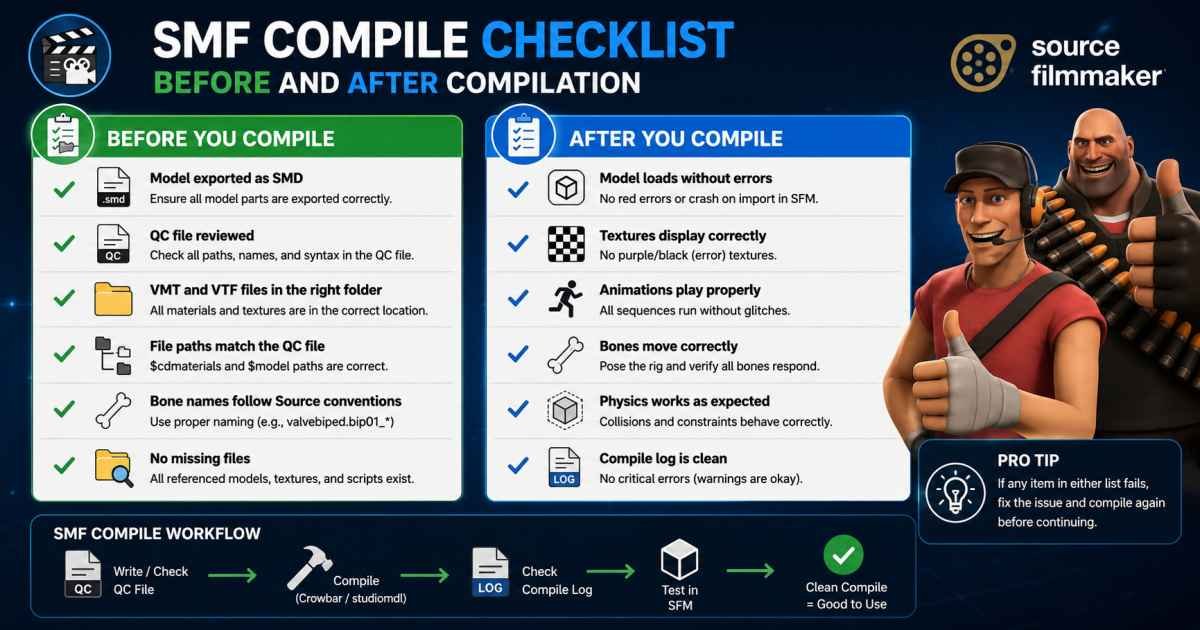
In the vast ecosystem of digital content creation and community management, few acronyms carry as much weight and as many meanings as “SMF.” For some, it stands for Source Filmmaker, a powerful tool for crafting cinematic masterpieces using game assets. For others, it represents Simple Machines Forum, a cornerstone of open-source community building. However, one term consistently emerges as a critical, yet often misunderstood, process: “SMF compile.” Regardless of which SMF you are working with, the concept of compilation is the linchpin that transforms raw, unworkable elements into polished, functional projects. This guide is designed to demystify the compilation process across both of these primary domains. Whether you are a forum administrator looking to install custom modifications or a digital artist preparing assets for rendering, understanding the intricacies of compilation will save you from technical headaches and elevate the quality of your work to a professional standard. Compilation is not just a technical hurdle; it is a fundamental practice that ensures compatibility, optimizes performance, and unlocks the full potential of your software or creative endeavors. We will explore the distinct workflows for compiling in Source Filmmaker and preparing components for Simple Machines Forum, providing a comprehensive roadmap to mastery.

Part 1: Compiling for Source Filmmaker (SFM)

What is SFM Compile and Why Does It Matter?

In the context of Source Filmmaker, “compilation” is the overarching process of preparing a scene and its assets for the final, polished output. This involves more than just hitting the “render” button; it is about ensuring every element—from a custom character model to a complex lighting setup—is optimized and correctly formatted to function within the Source engine. The compilation process is crucial because it prevents a myriad of issues that can plague animators, such as visual glitches, texture flickering, frustrating program crashes, and animation stuttering. The primary goal of any compile is to convert raw animation data and high-poly 3D models into a stable, playable, or renderable format that balances aesthetic quality with system performance.

The process can be broken down into three core preparation steps. First, scene optimization involves cleaning up the project by removing unused models and props to free up processing power and memory. It is also wise to check the polygon count of your models, as overly complex geometry can significantly slow down rendering times and even cause crashes. Second, finalizing camera and lighting settings is essential to ensure the scene looks as intended before the long render begins; properly configured lighting prevents washed-out scenes or harsh shadows, while subtle effects like Depth of Field add a layer of cinematic realism to the final export. Finally, ensuring your animations are smooth is critical; this means refining motion curves and checking for unnatural, jerky movements that might be less obvious during the initial creation process but become glaringly obvious in the final render.

The Compilation Methods: Choosing the Right Output

When you are ready to compile your project in SFM, you have several export options, each suited for different needs. The most recommended method for professional-quality work is the Image Sequence Export. This approach renders each frame of your animation as a separate high-quality image file, such as PNG or TGA. While this requires a second step—combining the images into a video file using software like Adobe Premiere or DaVinci Resolve—it is the gold standard because it preserves the absolute maximum quality without any compression artifacts. It also offers the flexibility to stop and resume rendering if a crash occurs. For quick previews or small, simple projects, you might choose AVI Video Rendering. This exports your animation directly as a video file, which is convenient, but it often results in larger file sizes and lower quality due to compression, and SFM may be more prone to crashing during a lengthy AVI export. Finally, for still images like posters or thumbnails, Poster Rendering is used. This method allows you to render a single frame at very high resolutions with advanced effects like Super Depth of Field, making it ideal for promotional artwork.

Adjusting Render Settings for Maximum Quality

To get the best results from your compile, you must fine-tune the render settings within SFM. The resolution of your output is paramount; for high-definition content, 1920×1080 (Full HD) is standard, while 3840×2160 (4K) is becoming increasingly popular for high-end projects. The frame rate (FPS) determines the smoothness of your animation; 30 FPS is standard for a cinematic feel, while 60 FPS is preferred for slow-motion shots or action-heavy sequences to create a buttery-smooth effect. Quality settings like Motion Blur and Anti-Aliasing are also essential; setting Motion Blur to “High” adds a realistic blur to fast-moving objects, reducing the “stutter” effect that can plague digital animation, while enabling Anti-Aliasing smooths out jagged “jaggies” on edges for a cleaner, more polished image.

Troubleshooting Common SFM Compile Errors

Even seasoned animators encounter errors during the compile process. Understanding these common pitfalls is the key to a smooth workflow. One of the most frustrating issues is SFM crashing during the render, often caused by the program running out of RAM or Video RAM (VRAM). This typically happens when a scene is too complex, using too many high-polygon models or high-resolution textures. The fix involves reducing the strain on your system; this could mean lowering texture resolutions, deleting unused assets, or rendering the scene in smaller “chunks” to avoid overloading the system memory. Another common problem is a rendered video appearing completely black or blank, which is usually a lighting issue; ensure you have proper light sources in the scene and try disabling “Progressive Refinement Mode” if it is active. Finally, if your final output looks low-quality or blurry, it is likely due to exporting directly to AVI with compression; the best solution is to switch to rendering an image sequence to ensure a lossless, detailed output.

Part 2: Compiling for Simple Machines Forum (SMF)

Defining “SMF Compile” in a Web Context

Moving away from 3D animation, the term “SMF compile” takes on a distinctly different meaning within the world of Simple Machines Forum. Unlike Source Filmmaker, the PHP code that powers SMF does not need to be “compiled” in the traditional sense of being converted into machine code. Instead, “SMF compile” is a colloquial term used by developers and forum administrators to describe the process of “assembling,” “packaging,” or “building” components for the forum software. This includes tasks like creating installable add-on packages, assembling theme files, and managing system caches. These are practical tasks of preparing and organizing PHP files, templates, CSS, JavaScript, and configuration data so that SMF can effectively read and use them. While it is not a technical compilation, the goal is the same: to take raw, scattered components and bring them together into a functional, integrated whole.

Compiling and Packaging Add-Ons

The most common “SMF compile” task for developers is the creation of a package—a mod or add-on that extends the forum’s functionality. This is a structured process. The developer must first organize all the necessary files—PHP source code, template files (often with SMF-specific tags), language strings for internationalization, and any associated assets like images—into a specific folder structure. The heart of the package is an installation XML file, which acts as a manual for the SMF Package Manager. This file tells the software exactly which files to copy to which directories, which lines of code to modify in existing files, and how to handle database changes. Finally, all these elements are compressed into a single archive file, like a ZIP, which forum administrators can easily upload and install through their admin panel. In this context, the “compile” is the developer’s act of bundling the code and creating the crucial instructions needed for flawless integration.

Building and Compiling Themes

Creating and packaging a custom theme is a similar but distinct “SMF compile” process. Theme designers must create a set of template files that adhere to SMF’s coding standards, complete with CSS for styling and JavaScript for client-side interactions. These themes must be organized into a specific directory structure that the software expects. A critical file in this process is the theme_info.xml (or similar) file, which describes the theme to the SMF system, listing its name, version, and the creator. Once these components are prepared and bundled into an archive, the theme is “compiled” for distribution. Administrators can then install the theme through their admin panel, allowing users to change the look and feel of their community instantly.

Cache Compilation and Performance

Finally, “SMF compile” can refer to the management of the forum’s cache. To boost performance and speed up page loading, SMF saves pre-built versions of its pages, configurations, and templates into a cache directory. When an administrator makes changes—for example, installing a new mod or altering a template—they may need to “clear the cache.” After clearing, SMF automatically rebuilds and “re-compiles” these cached versions of the data using the updated files and settings. This ensures that users see the new changes and that the site runs as efficiently as possible. This is a simple yet vital “compile” task for maintaining a fast and responsive forum.

Conclusion

Mastering the “SMF compile” process is an essential skill for anyone looking to achieve professional-quality results in their chosen medium, whether it is creating a cinematic masterpiece in Source Filmmaker or building a thriving online community with Simple Machines Forum. In Source Filmmaker, compilation is the technical bridge between your creative vision and the final render; it requires meticulous attention to scene optimization, the selection of correct render settings, and a robust understanding of troubleshooting common errors. The decision to use an image sequence over a direct AVI video, for instance, can be the difference between a pixelated, artifact-ridden output and a pristine, broadcast-quality film. Similarly, for the forum administrator, the compilation of packages and themes is the lifeblood of customization and community engagement. Understanding how to assemble an add-on or prepare a theme ensures that these modifications integrate seamlessly, enhancing user experience without breaking the core functionality of the site. Ultimately, whether you are fine-tuning the Depth of Field in a render or carefully editing a package-info.xml file, the core principle remains the same: effective compilation transforms raw potential into a polished, functional reality.

Frequently Asked Questions (FAQ)

Q1: What is the main difference between “SMF compile” for Source Filmmaker and “SMF compile” for Simple Machines Forum?
A1: The terms are completely different despite sharing the same acronym. In Source Filmmaker, it refers to the rendering process and asset preparation for creating videos and animations. In Simple Machines Forum, it is a colloquial term for packaging and installing modifications, themes, or managing caches for forum software, as the PHP code does not require traditional compilation.

Q2: Why should I export my Source Filmmaker project as an image sequence instead of an AVI video?
A2: Exporting as an image sequence (like PNGs or TGAs) is highly recommended for preserving the absolute best quality because it avoids the compression artifacts common in video files like AVI. It also provides more flexibility in post-production and protects against project loss, as you can easily resume rendering from the last frame if the process crashes.

Q3: My SFM render keeps crashing. What is the most likely cause and fix?
A3: The most common cause of SFM crashing during a render is the program running out of system memory (RAM) or graphics memory (VRAM), usually due to overly complex scenes. You can fix this by reducing the quality or number of assets in your scene, rendering in smaller chunks, or lowering the texture resolutions to lighten the load on your computer.

Q4: How do I install a custom modification or theme in Simple Machines Forum?
A4: You do this through the “Package Manager” in your SMF admin panel. First, you need the package file (usually a ZIP archive) that contains the “compiled” code and an installation XML file. You upload this file through the admin interface, and the package manager will follow the XML instructions to automatically modify the necessary files and install the add-on.

Q5: What is the purpose of the cache in Simple Machines Forum?
A5: SMF uses a cache to store pre-built versions of pages and configuration settings to improve loading speed and server performance. When you make changes to your forum, you may need to clear the cache from the admin panel. SMF then automatically “re-compiles” and rebuilds these cached files using the new settings, ensuring users see the updates promptly.

Continue Reading

Trending